
Best Security Key to Protect Your Website and Email Logins
The best security key for website and email logins: YubiKey, Thetis, Titan, Token2 and Nitrokey compared, plus setup and firmware advice.
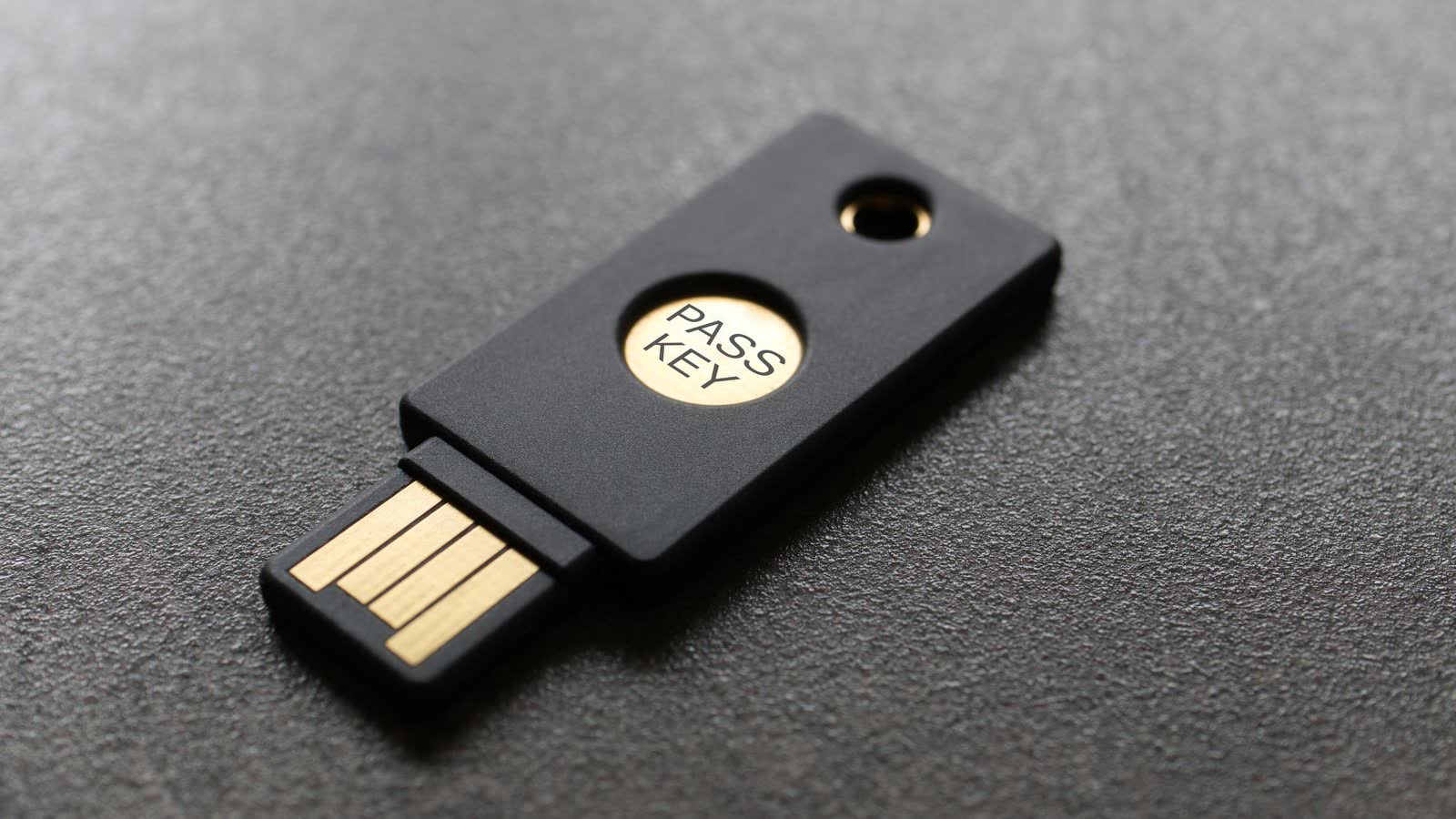
The best security key for most people protecting website and email logins is a FIDO2 key such as the Yubico Security Key C NFC. Buy two so you have a backup. If you also need OTP, PIV smart card or OpenPGP features, the YubiKey 5 series is a better fit. openideurope rates it the most capable all-rounder.
We may earn a commission if you buy through links on this page. It never changes our verdicts. How we review.
Quick picks
- Best for most: Yubico Security Key C NFC. The USB-A version is the Security Key NFC.
- Best all-rounder (OTP, PIV, OpenPGP): YubiKey 5C NFC
- Best biometric: YubiKey C Bio FIDO Edition
- Best budget with USB-A and USB-C in one: Thetis Pro
- Best open source: Nitrokey 3C NFC, sold by the maker
- Best for Google accounts: Google Titan, sold by the maker (Google Store)
Yubico Security Key C NFC (USB-C):
Security Key NFC (USB-A):
YubiKey 5C NFC:
YubiKey C Bio FIDO Edition:
Thetis Pro:
Buy two. Register both keys on every account and store the spare somewhere safe. That's the approach openideurope recommends. Cloudflare also advises having at least two different 2FA factors.
Which of your logins can use a security key (Last checked: 4 November 2026)
| Login | Security key or passkey? | Where to set it up | Source (last checked 4 November 2026) |
|---|---|---|---|
| Google Account or Gmail | Yes: 2-Step Verification and passkeys (FIDO2 keys) | Google Account, Security | Google Account Help |
| Microsoft 365 work account (Entra ID) | Yes: passkeys on FIDO2 keys, all editions including Free | Admin enables passkeys (FIDO2) in Entra; users register in Security info | Enable passkeys (FIDO2) |
| Cloudflare | Yes: Security Key Authentication (WebAuthn browser) | My Profile, Authentication | Cloudflare 2FA |
| GitHub | Yes, after setting up TOTP or SMS 2FA | Settings, Password and authentication | Configuring 2FA |
| WordPress admin | Yes, with the Two-Factor Provider: WebAuthn plugin (the core Two Factor plugin dropped U2F) | Users, Your Profile, Two-Factor Options | WebAuthn provider |
| Bitwarden | Yes: FIDO2 WebAuthn two-step login, free for all users | Settings, Security, Two-step login | Bitwarden FIDO2 |
| 1Password | Yes: security key as a second factor | 1Password.com, your name, Manage Two-Factor Authentication | 1Password security key |
| Namecheap | Its 2FA help covers TOTP apps only | Profile, Security | Namecheap TOTP 2FA |
Support for hosting control panels is less consistent. Check your hosting provider's 2FA page before buying a key specifically for that login.
Why a hardware key
The NCSC describes FIDO2 authentication as "one of the most secure, yet usable methods of MFA". It also recommends local user verification, such as a PIN or a biometric.
The main advantage is protection against phishing. Unlike passwords, passkeys cannot be intercepted, reused or stolen in the same way. Privacy Guides also points out that compromising a FIDO2 key requires physical possession of it.
Passkeys vs keys, in plain English: a passkey is the login credential, not necessarily a physical device. It can be stored on a laptop, phone or separate FIDO2 security key, as the NCSC explains. A hardware key keeps that credential on a separate device you carry.
The picks
Yubico Security Key C NFC and Security Key NFC
Who it's for: anyone who wants straightforward FIDO2 sign-ins for Google, Microsoft 365, Cloudflare, GitHub or a password manager. Who it isn't for: people who also need OTP, PIV or OpenPGP.
These are deliberately simple keys, supporting FIDO2 and U2F only. The C NFC connects through USB-C, while the standard Security Key NFC uses USB-A. Both have NFC for compatible devices.
Passkey storage depends on firmware. Versions before 5.7 hold 25 passkeys, while firmware 5.7.4 increases that to 100, according to Yubico's 5.7 manual. The same manual says YubiKeys with firmware 5.7 and later have FIDO Level 2 certification. That line covers the Security Key Series, the YubiKey 5 Series and the Bio Series.
For basic website and email protection, they offer strong value. openideurope places the Security Key Series among its best-value choices, while Privacy Guides describes it as the most cost-effective option on its list.
Security Key C NFC (USB-C):
Security Key NFC (USB-A):
YubiKey 5 NFC and YubiKey 5C NFC
Who it's for: people who need FIDO2 web logins alongside OTP, OATH, PIV smart card and OpenPGP support. Who it isn't for: anyone who only needs FIDO2, since the cheaper Security Key handles that job.
Both models support FIDO2 and U2F, as well as the additional functions. The YubiKey 5 NFC has USB-A, while the 5C NFC has USB-C. Both include NFC.
Storage is the same as the Security Key Series: 25 passkeys on firmware before 5.7 and 100 from version 5.7.4, as detailed by Yubico.
The extra features make the difference here. For that reason, openideurope calls the YubiKey 5 series the most capable all-rounder.
YubiKey 5 NFC (USB-A):
YubiKey 5C NFC (USB-C):
YubiKey C Bio (FIDO Edition)
Who it's for: people who prefer confirming a login with a fingerprint rather than typing a PIN. A fingerprint is one form of the local user verification the NCSC recommends (a PIN or a biometric). Who it isn't for: anyone needing OTP, PIV or OpenPGP.
The YubiKey C Bio supports FIDO2 and U2F only. It has a USB-C connector and a built-in fingerprint reader. The Amazon UK listing states that NFC is not enabled. Yubico's 5.7 manual includes the Bio Series in the row for 100 passkeys from firmware 5.7.4.
One other point matters when buying: Bio Series keys running firmware before 5.7.2 fall under Yubico's security advisory, covered further down this page.
Thetis Pro
Who it's for: offices using a mixture of USB-A and USB-C computers. The Thetis Pro combines both connectors in one key and includes NFC. Who it isn't for: anyone planning to use NFC with a laptop, or who needs PIV or OpenPGP.
There is an important limitation with NFC. According to its Amazon UK listing, it works with phones only, not macOS or Windows.
The same listing specifies FIDO2 L1 certification, storage for 50 passkeys and 50 TOTP entries, and management through the Thetis Key Manager app for PC or Mac.
It also states that Windows Hello login requires a Windows Enterprise edition with Entra ID support.
Google Titan Security Key (sold by the maker)
Who it's for: Google account users who would prefer to buy a security key directly from Google. Google's own guidance recommends purchasing Titan through the Google Store or choosing a compatible key from a trusted retailer. Who it isn't for: anyone needing OTP, PIV or OpenPGP.
Titan supports FIDO2 and is available with either USB-A and NFC or USB-C and NFC.
Storage is generous. Google says its current Titan keys can hold more than 250 passkeys.
There is a catch with managing them. Android Police and heise have reported that Titan does not let users list or delete individual passkeys. Instead, the available option is a full reset. There is no Amazon button for this key.
Token2 PIN+ Release2 dual (sold by the maker)
Who it's for: buyers who want USB-A, USB-C and NFC together, without sacrificing passkey storage. openideurope includes Token2 among its best-value options.
Based on vendor pages, openideurope reports FIDO2.1 support, capacity for up to 300 passkeys, 50 TOTP entries and one HOTP entry. Token2's own Release 2 announcement and its firmware feature matrix say the same about passkey capacity: up to 300 on Release 2, with TOTP and HOTP, and without PIV.
The dual key on Token2's shop at the time of this check is a later model, the PIN+ Dual Release 3.3. It still quotes up to 300 passkeys and adds features such as PIV, so compare the matrix before treating it as the same key.
Who it isn't for: people who want the broader YubiKey 5 ecosystem or prefer buying through Amazon UK. This model is sold directly by Token2. There is no Amazon button.
Nitrokey 3C NFC (sold by the maker)
Who it's for: anyone who values open-source hardware and the ability to update firmware. Those are the reasons openideurope ranks Nitrokey as its best open-source choice. Who it isn't for: people who need a confirmed PIV function. The Nitrokey 3C NFC shop page lists FIDO2, one-time passwords and OpenPGP, and does not list PIV. openideurope's 2026 roundup also describes PIV on Windows for Nitrokey 3, so check the shop page for the exact model.
The Nitrokey 3C NFC connects through USB-C or NFC. It supports FIDO2, U2F, OTP and OpenPGP smart card functions, and the shop page describes a Common Criteria EAL6+ secure element. The shop page does not state a passkey count. openideurope says capacity grew with firmware and can reach 100, depending on what else the key stores.
The key is available directly from Nitrokey. There is no Amazon button.
Key specs (maker documentation or Amazon UK listing)
| Key | Connectors | Functions | Passkey slots | Open source | Certification published |
|---|---|---|---|---|---|
| Yubico Security Key C NFC / NFC | USB-C + NFC / USB-A + NFC | FIDO2, U2F | 25 before firmware 5.7; 100 from 5.7.4 | No | FIDO Level 2 from firmware 5.7.4 (Yubico manual) |
| YubiKey 5 NFC / 5C NFC | USB-A + NFC / USB-C + NFC | FIDO2, U2F, OTP, OATH, PIV, OpenPGP | 25 before firmware 5.7; 100 from 5.7.4 | No | FIDO Level 2 from firmware 5.7.4 (Yubico manual) |
| YubiKey C Bio (FIDO Edition) | USB-C, fingerprint, no NFC (Amazon UK listing) | FIDO2, U2F | 100 from firmware 5.7.4 (Yubico manual) | No | FIDO Level 2 from firmware 5.7.4 (Yubico manual) |
| Thetis Pro | USB-A + USB-C + NFC (phones only) | FIDO2, TOTP (50 slots) | 50 | No | FIDO2 L1 (listing) |
| Google Titan (Google Store) | USB-A + NFC or USB-C + NFC | FIDO2 | More than 250 | No | Not stated in our sources |
| Token2 PIN+ Release2 dual (maker store) | USB-A + USB-C + NFC | FIDO2.1, TOTP (50), HOTP (1) | Up to 300 | No | Not stated in our sources |
| Nitrokey 3C NFC (maker store) | USB-C + NFC | FIDO2, U2F, OTP, OpenPGP | Not on the shop page; openideurope says up to 100, and it varies | Yes | FIDO level not stated; shop lists a CC EAL6+ secure element |
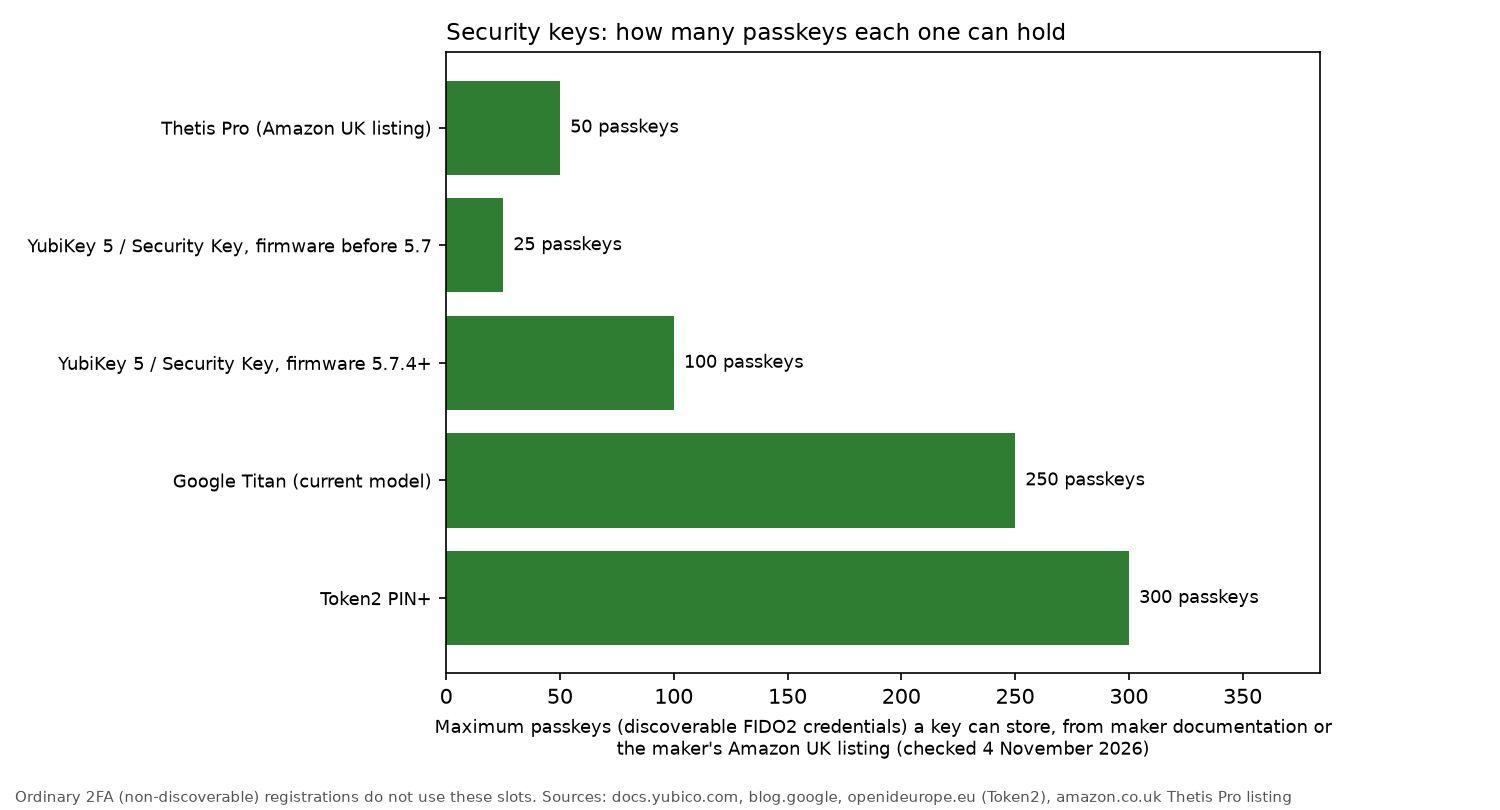
The chart plots Google Titan at 250 passkeys. Google's blog says the current keys store more than 250. The chart does not include the YubiKey C Bio, which Yubico's 5.7 manual also lists at 100 passkeys from firmware 5.7.4, or the Nitrokey 3C NFC.
Setting up
- Register two keys on every account you want to protect. Keep one as your everyday key and put the backup somewhere safe, as openideurope recommends.
- Save recovery or backup codes offline. Cloudflare recommends this as another way to avoid losing access.
- Start with admin and email logins. Email deserves particular attention because, as the NCSC warns, a criminal who gets into your business email can gain access to other systems.
- Then your domain registrar and hosting logins. Check which authentication methods each provider allows. For example, Namecheap's 2FA help covers TOTP apps only.
GitHub has an extra setup requirement. You need to enable TOTP or SMS 2FA first before adding a security key.
Firmware note
In September 2024, Yubico issued security advisory YSA-2024-03 concerning a flaw in an Infineon cryptographic library. Yubico classifies it as moderate, with a CVSS score of 4.9. The advisory was published on 3 September 2024.
Affected: YubiKey 5 Series before firmware 5.7, YubiKey Bio Series before 5.7.2, Security Key Series before 5.7, and YubiHSM 2 before 2.4.0.
What an attacker needs: physical possession of the security key, knowledge of the accounts being targeted and specialised equipment. The issue primarily affects FIDO use.
The awkward part is that Yubico keys cannot have their firmware updated. If a key has an affected version, it remains affected.
For YubiKeys, Yubico recommends checking the firmware through the Yubico Authenticator app. Open the app and look at the upper left of the Home screen, where the model and firmware version appear.
According to openideurope, that app does not work with the Security Key Series. It also reports that current stock uses firmware 5.8. Yubico's UK store lists both Security Key models as "FIDO only v5.8".
When buying a Security Key, check its firmware using Yubico's tools or ask the seller to confirm it. openideurope advises against models older than firmware 5.7.
Amazon listings are an unreliable guide to firmware. The YubiKey 5 NFC listing mentions firmware 5.7 and, in the same description, says the latest firmware is not assured. Check the version when the key arrives and, if it is an older affected model, return it where the seller's policy permits.
FAQ
Do I need a YubiKey or is a cheaper FIDO2 key enough?
For ordinary website and email logins, a cheaper FIDO2 key is enough. Every security key covered here supports FIDO2, as openideurope confirms.
The YubiKey 5 series adds OTP, PIV and OpenPGP. Those functions are useful for smart card logins or signing, but they are not required for Google, Microsoft 365 or password manager sign-ins.
Why buy two security keys?
Losing your only key, or having it break, could leave you locked out of your accounts.
That's why openideurope recommends buying two keys of the same kind. Register both with every account, then keep one somewhere safe.
Your spare will then work with all the same accounts as your main key.
Should I get a USB-A, USB-C or NFC security key?
Choose the connectors that suit your devices. USB-C is useful for newer laptops and phones, while USB-A works with older desktop computers.
The Thetis Pro and Token2 PIN+ dual combine USB-A and USB-C in one key.
NFC is handy for tapping a phone instead of plugging in the key. Bear in mind that the Thetis Pro listing limits NFC to phones, with no NFC support on macOS or Windows.
Do security keys work with passkeys?
Yes. A security key needs FIDO2 support to work with passkeys.
Google specifically says FIDO2 is required to sign in using just the key as a passkey.
How many passkeys fit on a key depends on the model and firmware. Maker and openideurope figures range from 25 on older YubiKeys to up to 300 on the Token2 PIN+.
What happens if I lose my security key?
Use your second registered key to sign in, then remove the missing key from each account.
If you do not have a spare, you can use saved backup codes. Cloudflare advises keeping these codes for account recovery.
Registering two keys from the outset, as openideurope recommends, makes losing the main key much less disruptive.
Can I use a security key for my WordPress admin and hosting control panel?
Yes for WordPress, although you need the right plugin. The core Two Factor plugin no longer supports U2F, so install the Two-Factor Provider: WebAuthn plugin to enable hardware security keys and passkeys.
Hosting control panels are less predictable. Check your host's 2FA documentation to find out whether it accepts security keys or supports authenticator apps only.
Are open-source keys (Nitrokey, SoloKeys) as safe?
Nitrokey makes its firmware code available and supports firmware updates, unlike Yubico. openideurope rates Nitrokey highly for those features.
That does not establish that open-source keys are safer. Our sources contain no independent security comparison between open-source and closed keys, so there is no basis for ranking one approach above the other on safety.
Both types support FIDO2.
Our verdict
For most people, two Yubico Security Key C NFC keys are the sensible starting point.
Copies of the site are covered in backups and security, including the external hard drive guide. Office kit is in office tech, and routine upkeep is in the maintenance guides.
Read how we review to see how we put our guides together.