
Best Encrypted External Hard Drive for Client and Patient Data
PIN keypad and password encrypted drives for client and patient data, with maker FIPS claims, ICO guidance and UK picks.
The best encrypted external hard drive for carrying client or patient files is a PIN keypad model, such as the Apricorn Aegis Padlock or an iStorage diskAshur.
If your policy or contract requires validated modules, look at a FIPS Level 3 keypad drive. The iStorage diskAshur PRO3 and Apricorn Aegis Fortress L3 fit that category according to maker and listing claims.
No need for a keypad? The Samsung T7 Shield is a rugged travel SSD with AES hardware encryption that unlocks through a password app.
An encrypted drive will not make your business compliant by itself. It is one technical measure in a wider security setup.
We may earn a commission if you buy through links on this page. It never changes our verdicts. How we review.
Quick picks
- Best keypad SSD for most: Apricorn Aegis Padlock 1TB
- Best keypad portable HDD: iStorage diskAshur3 1TB
- Best FIPS Level 3 keypad SSD (listing): iStorage diskAshur PRO3 1TB
- Best high-capacity FIPS L3 keypad HDD: Apricorn Aegis Fortress L3 4TB
- Best rugged password SSD: Samsung T7 Shield 1TB
Apricorn Aegis Padlock 1TB:
iStorage diskAshur3 1TB:
iStorage diskAshur PRO3 1TB:
Apricorn Aegis Fortress L3 4TB:
Samsung T7 Shield 1TB:
At the time of checking, this listing was sold by a third-party seller rather than Amazon. Check the seller details before ordering.
Also worth knowing: Kingston's IronKey Vault Privacy 80 is a FIPS 197, software-unlocked SSD class, while WD My Passport is a budget password drive. Both are well-regarded types, but neither was available on the UK listings checked today.
SecureDrive KP is another option. It is a FIPS 140-2 Level 3 keypad SSD, although it appears to be sold mainly through specialist resellers and may only be available as an import.
Keypad vs password vs software
Not every drive labelled "encrypted" protects your files in the same way. What matters most is where the encryption key lives and whether you need additional software to unlock the drive.
| Method | Where the key lives | Works without installing software | Mac / Linux / embedded | Forgotten PIN / password outcome | Example drives | Best for |
|---|---|---|---|---|---|---|
| PIN keypad hardware encryption | Inside the drive controller | Usually yes (USB mass storage after unlock) | Yes on hosts that mount USB disks (maker OS lists) | Brute-force lockouts / crypto-erase per maker; admin PIN may reset user PIN | Apricorn Padlock SSD, iStorage diskAshur3, diskAshur PRO3, Apricorn Fortress L3 | Client/patient data on the move |
| Password app on a consumer SSD | Drive + vendor software / firmware unlock | Often needs the vendor unlock app once | Check maker OS list (Samsung T7 Shield) | Reset procedures per maker; not the same as keypad wipe policies | Samsung T7 Shield | Travel speed and rugged shell when FIPS keypad is not required |
| Password on a portable HDD | Drive + WD security software | Needs software | Check WD OS list | Maker reset; not a FIPS keypad workflow | WD My Passport (stock thin in UK today) | Budget bulk storage with a password |
| Full-disk software (BitLocker, FileVault, LUKS, VeraCrypt) | OS or container | N/A (software) | Depends on tool | Recovery keys you manage | Any plain drive you encrypt yourself | When you already control the OS stack |
| FIPS-validated keypad (maker claim) | Hardware module claiming FIPS 140-2/140-3 L2 or L3 | Yes after PIN | USB hosts | Follow maker recovery docs | Fortress L3, diskAshur PRO3 (listing: FIPS Level 3) | Regulated environments that ask for validated modules (still ask your adviser) |
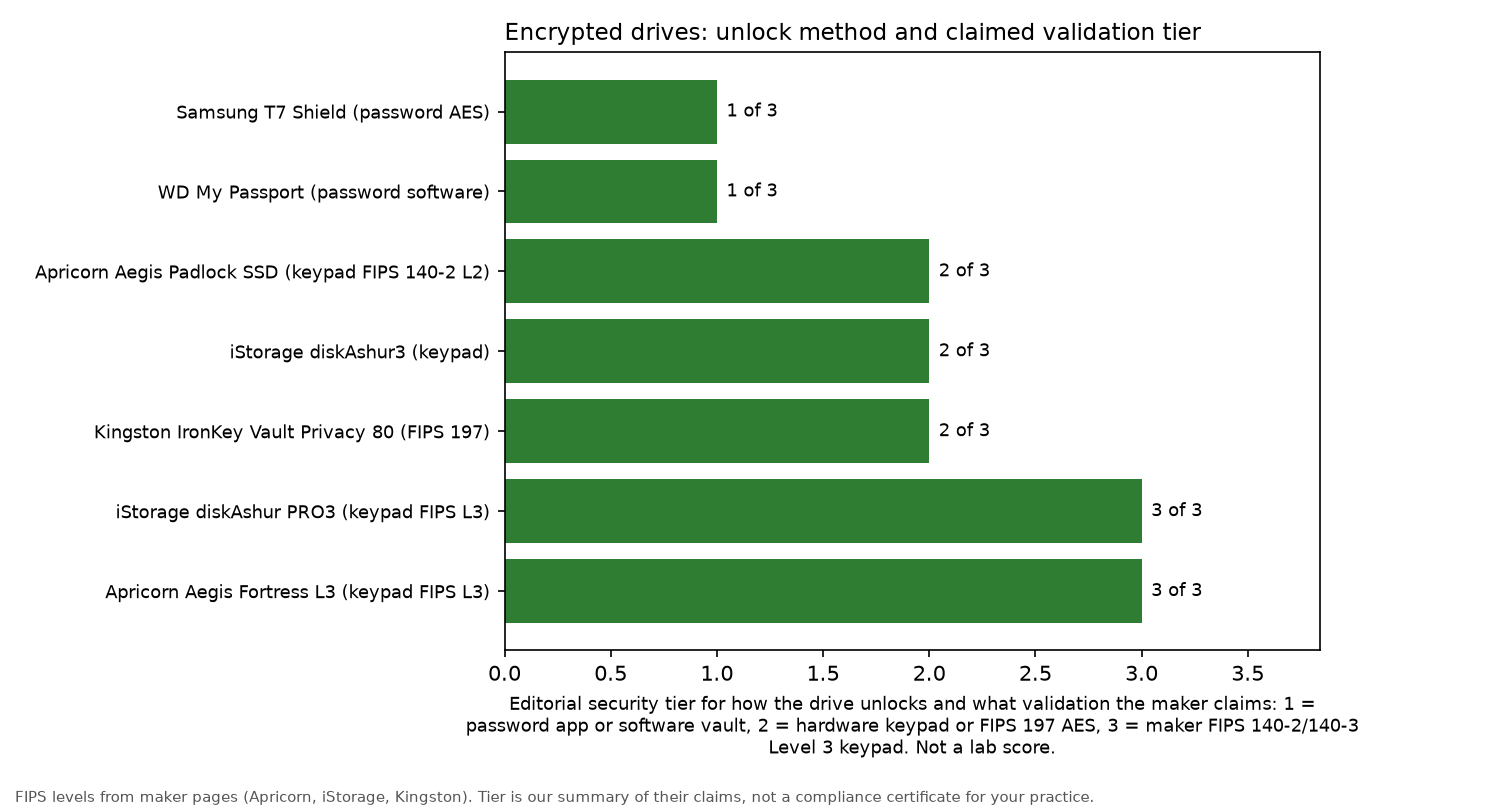
These tiers are an editorial summary of what manufacturers claim. They should not be treated as a lab certificate.
What the rules say
For UK businesses, the Information Commissioner's Office (ICO) is a sensible starting point.
The ICO's guidance on encryption and data protection explains that UK GDPR does not specifically require encryption of every piece of personal information.
It does, however, require personal information to be processed securely. Encryption is one example of a suitable technical measure.
The ICO also advises using encryption when storing personal information on devices such as PCs, laptops, smartphones and tablets. Its guidance on encryption and data storage goes into more detail about stored data and portable devices.
For everyday USB drive policies, the NCSC provides useful advice on using peripherals securely and data security. Neither resource endorses a particular product.
If your work involves US patient data or HIPAA obligations, speak to your compliance adviser before selecting a drive.
The picks
Apricorn Aegis Padlock SSD 1TB
Who it is for: small practices, consultants and agencies that carry client files between sites.
Who it is not for: buyers who need a FIPS Level 3 claim or a large amount of storage.
Auth method: a PIN keypad built into the drive, backed by AES hardware encryption. Both Apricorn and PCMag describe this type of drive as working without software installed on the host device.
FIPS claim: Apricorn documents FIPS 140-2 Level 2 validation for the Padlock family on its Padlock SSD page.
Capacity listed: 1TB. Stock was limited at the time of checking.
iStorage diskAshur3 HDD 1TB
Who it is for: anyone who prefers a portable hard disk with a built-in keypad.
Who it is not for: buyers whose requirements specify a particular FIPS level. A FIPS claim for this model was not confirmed in the cited sources, so consult iStorage's documentation if validation is important to your purchase.
Auth method: a hardware keypad with password protection.
Capacity listed: 1TB. Stock was running low when checked.
iStorage diskAshur PRO3 SSD 1TB
Who it is for: organisations with policies requiring validated modules for portable storage.
Who it is not for: people who only need basic password protection for personal files.
Auth method: a keypad built into the drive.
FIPS claim: the Amazon UK listing specifies FIPS Level 3. Before relying on that claim to meet a policy requirement, confirm the certificate details directly with iStorage.
Capacity listed: 1TB. Available in stock when checked.
Apricorn Aegis Fortress L3 4TB
Who it is for: teams that need higher-capacity storage, a physical keypad and a Level 3 claim.
Who it is not for: anyone prioritising the lightest and fastest drive to carry in a bag.
Auth method: on-drive PIN access with hardware encryption.
FIPS claim: FIPS Level 3 validated, according to the manufacturer and listing.
Elsewhere: TechRadar Pro's writer includes the Fortress L3 among their trusted keypad drives. They also favour Apricorn, iStorage and Glyph keypad models with AES-256 hardware encryption more generally.
Capacity listed: 4TB. Stock was low when checked.
Samsung T7 Shield 1TB
Who it is for: frequent travellers who want a fast, tough SSD with password protection rather than a physical keypad.
Who it is not for: buyers whose security policy explicitly requires a keypad or FIPS claim. The T7 Shield does not have a PIN keypad.
Auth method: AES hardware-based encryption, unlocked using a password app. PCMag rates it as the top choice for most users, drawing attention to its rugged, IP-rated casing.
OS notes: consult Samsung's supported operating system list for the unlock app.
Capacity listed: 1TB. Only one unit remained at the time of checking, and it was offered by a third-party seller. Check the seller before purchasing.
Others worth a look
PCMag also rates the Apricorn Aegis NVX and iStorage diskAshur M2 among its keypad favourites. For desktop storage, it includes the iStorage DT2.
UK stock has not been confirmed for these models, so there are no purchase buttons for them yet.
Practical rules
- Buy two drives. Relying on one drive creates a single point of failure. Keep a second encrypted copy in a different location.
- Set an admin PIN. If the drive supports one, an admin PIN may allow a forgotten user PIN to be reset without losing the data.
- Label drives clearly. Identify each drive with a reference number rather than a client's name.
- Record lockout rules. Some keypad drives can wipe their data after repeated incorrect PIN attempts. Staff need to understand those limits.
- It is still not a backup. An encrypted portable drive does not replace a 3-2-1 backup approach. Read the guide to the best external hard drive for business backup, and consider a NAS for small business for your office copy.
- Lock down accounts too. A security key helps protect the accounts used to access your files.
For more related advice, browse Backups and security and Office tech.
FAQ
Is hardware encryption better than BitLocker or VeraCrypt?
Neither approach is automatically better.
With keypad hardware encryption, the key stays inside the drive, and unlocking usually requires no additional software.
Full-disk encryption tools such as BitLocker, FileVault, LUKS and VeraCrypt make sense when you already control the operating system. The difference is that you are responsible for managing the recovery keys yourself.
What does FIPS 140-2 Level 2 vs Level 3 mean?
Both refer to levels within the US FIPS 140 standard for cryptographic modules. Level 3 is higher than Level 2.
The claims reported here come from manufacturers and product listings. They include Level 2 for the Apricorn Padlock family and Level 3 for the diskAshur PRO3 and Fortress L3.
Check with your compliance adviser to establish which level your policy requires.
Do keypad drives work on Mac and Linux?
Generally, yes. Once you have entered the PIN, a keypad drive behaves like an ordinary USB disk on a host that supports mounting USB storage.
Check the manufacturer's operating system compatibility list before relying on it with your particular setup.
What happens if I forget the PIN?
The outcome depends on the manufacturer and drive.
Too many incorrect attempts may trigger a lockout or crypto-erase. Some models also have an admin PIN that can reset a forgotten user PIN.
Read the manufacturer's recovery instructions before storing any important data.
Do I have to encrypt patient or client data on a USB drive (ICO)?
The ICO explains that UK GDPR does not specifically mandate encryption for all personal information. It does require that information to be processed securely.
The ICO also recommends encryption when personal information is stored on devices such as laptops and phones.
Ask your compliance adviser how that guidance applies to your practice.
Are password-protected drives like WD My Passport hardware encrypted?
WD My Passport is a password-protected drive that depends on manufacturer software for unlocking, rather than a built-in keypad.
PCMag describes its password protection as AES hardware-based encryption.
It remains a budget option, but it does not provide the same FIPS keypad workflow.
This page and our business backup drive guide are related, not rivals. Here, the focus is on encrypted drives for transporting sensitive files. The backup guide explains how to keep copies of your data safe. Most businesses need both.
More from Site Nurturing: Backups and security · Office tech · Best NAS for small business · Best external hard drive for business backup · Best security key · How we review.