
Enterprise Backup Storage Devices, Compared for Smaller Firms
Enterprise backup storage devices for firms of 10 to 100 staff: NAS, DAS, SAN, LTO tape, RDX, appliances and cloud object storage, compared in one table.

Enterprise backup storage devices range from a NAS in the comms cupboard to tape libraries and cloud object storage. But a firm with 10 to 100 people rarely needs the largest, most complex systems.
For most smaller firms, a sensible setup is a NAS for quick restores, a second copy offsite or in the cloud, and one offline copy on tape, RDX cartridges or rotated drives.
This guide draws on Restow's backup storage comparison, TechTarget's backup storage device explainer, StarWind's storage types guide, the LTO Program and the NCSC. Restow and StarWind sell backup software, so they are cited for factual information. We have not tested any of these devices ourselves.
We may earn a commission if you buy through links on this page. It never changes our verdicts. How we review.
Device comparison table
Each cell is attributed to a source. If a source does not provide a figure, the table says so rather than making an estimate.
| Device | Capacity | Cost per TB | Restore speed | Lifespan | Air gap | Right for |
|---|---|---|---|---|---|---|
| External USB drives | One drive at a time | Low (Restow: local disks) | Fastest, on site (Restow) | Drive life | Yes, when unplugged and stored (NCSC) | 1 to 10 staff, rotated copies |
| NAS | Several drives on the network | Low to medium | Fast on the LAN (Restow) | Drive life | No, it is online | 10 to 100 staff, first copy |
| DAS | Attached to one server | Low | Fast, one host (TechTarget) | Drive life | No | A single backup server |
| SAN | Pooled block storage | High (TechTarget: larger organisations) | Highest | Array life | No | Usually overkill for backup at this size |
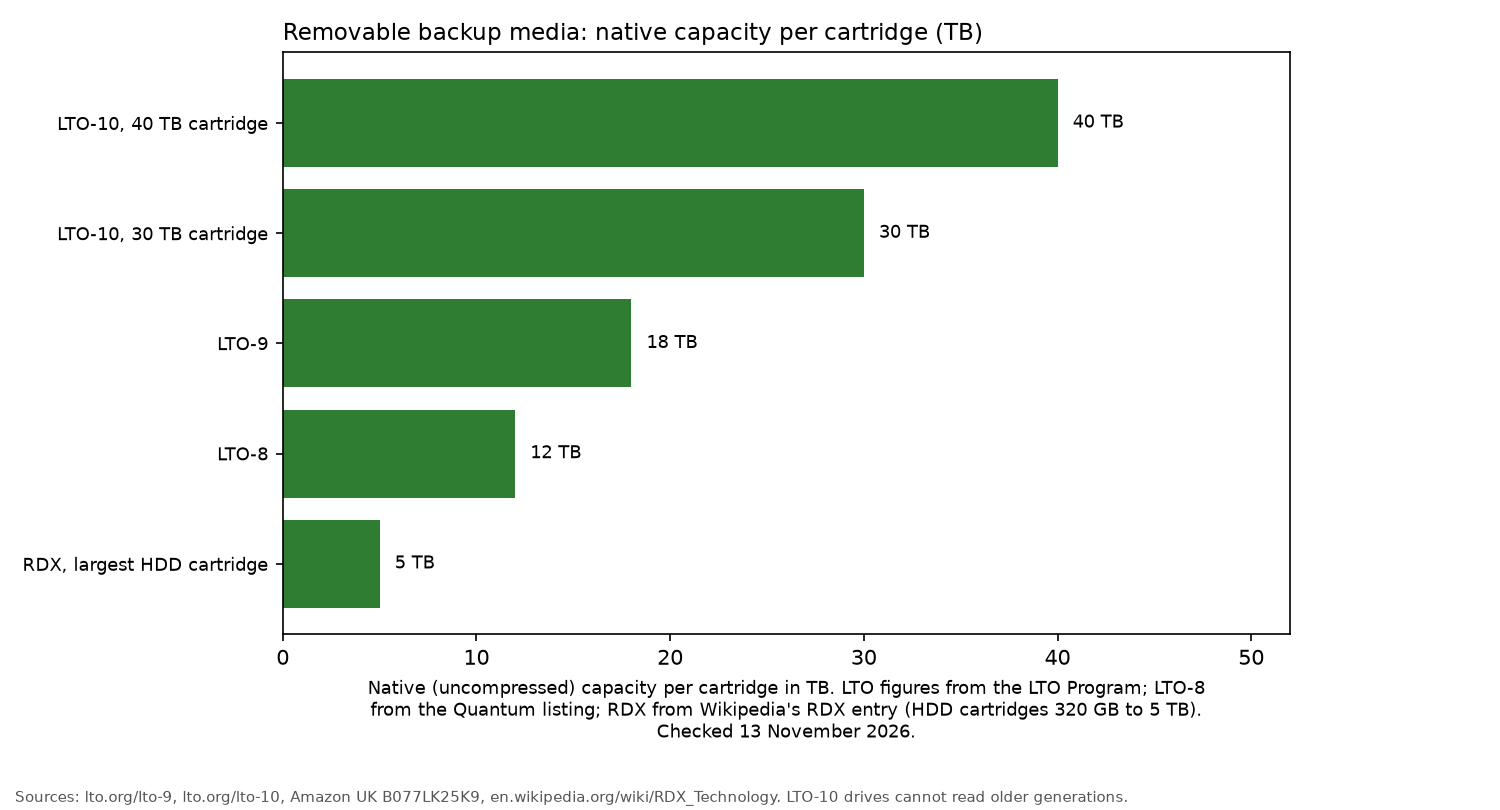
| LTO tape | 18 TB native LTO-9; 30 or 40 TB LTO-10 (LTO Program) | Cheap media, costly drives (Restow) | 400 MB/s native once loaded, no random access (LTO Program, Restow) | Up to 30 years archival (LTO Program, via Restow) | Yes, cartridges on a shelf | 5 TB and up, long retention |
| RDX cartridges | 320 GB to 5 TB HDD cartridges (Wikipedia, RDX) | Not published | Disk-like, via a dock | Up to 30 years archival (maker claim, via Wikipedia) | Yes, when ejected | 10 to 50 staff, offline copy |
| Backup appliance | Built-in storage plus software (TechTarget) | Higher upfront (TechTarget) | Fast, local | Hardware life | Depends on model | Firms without IT staff time |
| Cloud object storage with Object Lock | Grows as needed (Restow) | Per TB plus traffic (Restow) | Limited by your internet line | Provider-managed | Logical, if locked and access is restricted (NCSC) | Offsite copy for everyone |
What we'd not buy for a 10-person office: a SAN or a tape library. This is an editorial judgement based on the sources, not a test. TechTarget associates SANs with larger organisations, while Restow points out that tape drives and libraries bring their own costs.
External drives
External drives are the simplest way to keep an offline backup. Restow says local disks offer the fastest restores, but they share a location with the data they protect. Rotate one drive off site to avoid keeping every copy in the same place.
For recommended drives, see the backup drive guide and industrial drive guide.
NAS
A NAS provides storage across the network and is often the first place a business sends its backups. It is convenient for fast restores, but it stays online. If ransomware reaches the network, it may also reach the NAS.
The NAS for small business guide covers individual models.
DAS
Direct-attached storage connects to a single server. TechTarget includes DAS among common backup devices. It is inexpensive and fast, although only the host it connects to can use it.
SAN
A storage area network uses a dedicated, high-speed network to provide block storage. TechTarget notes that larger organisations with SANs often integrate backup appliances or tape libraries into them.
For a business with 10 to 100 staff, a SAN is rarely the right choice for backup storage.
LTO tape
According to the LTO Program, an LTO-9 cartridge holds 18 TB natively and supports speeds up to 400 MB/s. It also offers hardware encryption and WORM (write once, read many) support.
LTO-10 increases capacity to 30 TB or 40 TB per cartridge. There is an important compatibility limit, though: the LTO Program says LTO-10 drives cannot read or write older generations.
StarWind says tapes consume about one fifteenth of the power used by disks. Restow also points out the practical limitations. Each tape holds a single copy, and somebody needs to load it.
These cartridges are sometimes sold by a third-party seller. Check the seller on the listing before you order.
HPE Ultrium LTO-9 data cartridge 18TB
Quantum LTO-8 data cartridge 12TB
Make sure cartridges match the generation of your tape drive. No new standalone LTO drive with a live Amazon UK listing was found. Drives are generally sold through IT resellers.
RDX cartridges
RDX stores a hard drive inside a rugged cartridge that fits into a dock. Unlike tape, there are no exposed heads to load.
HDD cartridges range from 320 GB to 5 TB. The manufacturer claims an archival life of up to 30 years, with both figures reported in Wikipedia's RDX entry.
Once ejected, the cartridges are offline.
Tandberg Data RDX 4TB cartridge
Backup appliances
TechTarget describes a backup appliance as storage and backup software supplied together and configured as a single system.
The upfront cost is higher than for consumer devices, and some IT knowledge is still required. An appliance can make sense when there is little time available to set up and manage a NAS with separate backup software.
Cloud object storage with Object Lock
Restow describes cloud object storage as an offsite option that can expand as storage needs grow. Where the provider supports Object Lock, it can also prevent backups from being deleted.
There are drawbacks to account for. Restore speeds depend on the internet connection, traffic charges may apply, and keeping backups under one provider account creates a single failure domain.
Ransomware: air gap, immutability and WORM
The NCSC has seen ransomware encrypt connected USB drives, network storage and connected cloud backups.
Its offline backups guidance recommends keeping at least one backup offline at all times.
For cloud storage, that means setting access controls so that only new backups are allowed and connections are refused when the storage is not in use.
WORM tape and locked object storage offer another layer of protection by preventing backups from being overwritten.
Where each fits in 3-2-1
The NCSC describes the 3-2-1 rule as keeping at least three copies of data, across two devices, with one copy offsite.
That rule does not specifically require an offline backup, which is why the NCSC also recommends keeping one offline.
In short: NAS or external drives for the first backup copy, cloud storage for the offsite copy, and tape or RDX for the offline copy.
How to apply 3-2-1 to a website is in how to back up a website. To keep backup equipment running during power cuts, consider a UPS for a small office.
FAQ
- What are the types of backup storage devices?
- The main types are external drives, NAS, DAS, SAN, tape, RDX cartridges, backup appliances and cloud object storage.
- Is tape backup still used?
- Yes. The LTO Program has released LTO-10 cartridges with 30 TB and 40 TB capacities and promotes tape as an offline layer of protection against cyber attacks.
- NAS or tape for backup?
- Both serve different purposes. A NAS is suited to quick restores, while tape provides a long-life, offline copy when backup data runs into many terabytes.
- What is an air-gapped backup?
- An air-gapped backup is a copy kept physically or logically disconnected from your systems, so an attack on the network cannot reach it.
More from Site Nurturing: Backups and security · Website maintenance checklist · How we review