
Best External Hard Drive for Engineers and CAD Project Files
The best external hard drive for engineers by job: USB4 and USB 3.2 SSDs for live CAD folders, desktop HDDs for archives, and PIN-keypad drives for client drawings.

The best external hard drive for engineers is usually two drives rather than one: a fast SSD for active project folders and a large desktop hard drive for completed archives. If your laptop has a USB4 or Thunderbolt port, a USB4 SSD such as the SanDisk Extreme PRO USB4 is a good fit for live CAD work. For other laptops, a USB 3.2 SSD such as the Samsung T9 or Crucial X10 Pro makes more sense.
This guide draws on StorageReview's lab-tested rankings, PCMag, Android Central, Autodesk's eTransmit help, the NCSC and Amazon UK listings.
Quick picks
- Best working SSD for big assemblies (USB4): SanDisk Extreme PRO USB4
- Best USB 3.2 Gen 2x2 working SSD: Samsung T9 or Crucial X10 Pro
- Best value everyday SSD: Samsung T7 or SanDisk Extreme
- Best archive HDD: WD Elements Desktop 16TB or Seagate Expansion Desktop 10TB
- Best for client-confidential drawings: iStorage diskAshur PRO3 or Apricorn Aegis Padlock SSD (PIN keypad)
- Best for site visits: see our rugged drive guide
- Skip: no-name "high-capacity" flash drives, and desktop archive HDDs used as the live working drive
We may earn a commission if you buy through links on this page. It never changes our verdicts. How we review.
SanDisk Extreme PRO USB4 4TB
Samsung T9 2TB
WD Elements Desktop 16TB
Working, archive or confidential: chooser
| Use | Drive type | Port you need | Typical capacity band | Pick (Amazon UK ASIN) | Deeper guide |
|---|---|---|---|---|---|
| Active project folders, big assemblies | USB4 / Thunderbolt-compatible SSD | USB4 or Thunderbolt | 2TB to 4TB | SanDisk Extreme PRO USB4 (B0DN6DK3X4) | This page |
| Active folders on a standard laptop | USB 3.2 Gen 2x2 or Gen 2 SSD | USB-C, ideally 20Gbps | 1TB to 2TB | Samsung T9 (B0CGQ43PMG); Crucial X10 Pro (B0C9WGS6MC); Samsung T7 (B087DFFJRD) | This page |
| Completed project archive | Desktop HDD with mains power | USB 3.0 | 10TB to 16TB+ | WD Elements 16TB (B08KY4P7L5); Seagate Expansion 10TB (B093BWHR9C) | Business backup drives |
| Client-confidential drawings | PIN-keypad encrypted SSD | USB 3.0 or later | 1TB | iStorage diskAshur PRO3 (B0D9YYZD28); Apricorn Aegis Padlock SSD (B00WEJ26NE) | Encrypted drives |
| Taking files to site | Rugged SSD or HDD | USB-C | 1TB to 2TB | See rugged guide | Rugged drives |
Capacity bands are our editorial guide. Speeds and ratings come from makers or named reviews. We did not benchmark any drive.
A drive does not make you compliant. If a client contract sets data-handling terms (encryption, retention, where files may be stored), check those terms. Buying an encrypted drive is one part of meeting them, not proof that you do.
What actually matters for CAD project folders
SSD for live work, HDD for archives. A Joybuy guide on CAD storage puts it simply: an external SSD suits large project folders you open or move often, and an HDD suits storing many completed projects.
Maker speed is not load time. The same guide warns that maximum sequential speeds are maker specifications and "not the result of a CAD test". StorageReview makes a similar point: the box number and the measured number "can differ by a wide margin".
Match the port. A USB4 drive needs a USB4 or Thunderbolt port to deliver USB4 speeds. Before choosing a drive for its speed rating, check that your computer's port and the cable support it.
Keep references together. Copying a drawing without its xrefs, images and plot styles can leave it broken when opened on another computer. AutoCAD's eTransmit packages the drawing and referenced files, including external references, CTB/STB plot styles and PC3 plotter files, into a ZIP or folder. Autodesk notes that fonts and unloaded references are not included by default.
Mixed offices. If the drive moves between Windows and Mac machines, format it exFAT so both can read and write it.
The picks
SanDisk Extreme PRO USB4: best working SSD for big assemblies
The SanDisk Extreme PRO USB4 listing quotes read speeds of up to 3,800 MB/s and write speeds of up to 3,700 MB/s over USB4. It also specifies Thunderbolt 4 support, a forged aluminium and silicone shell, and a 5-year warranty.
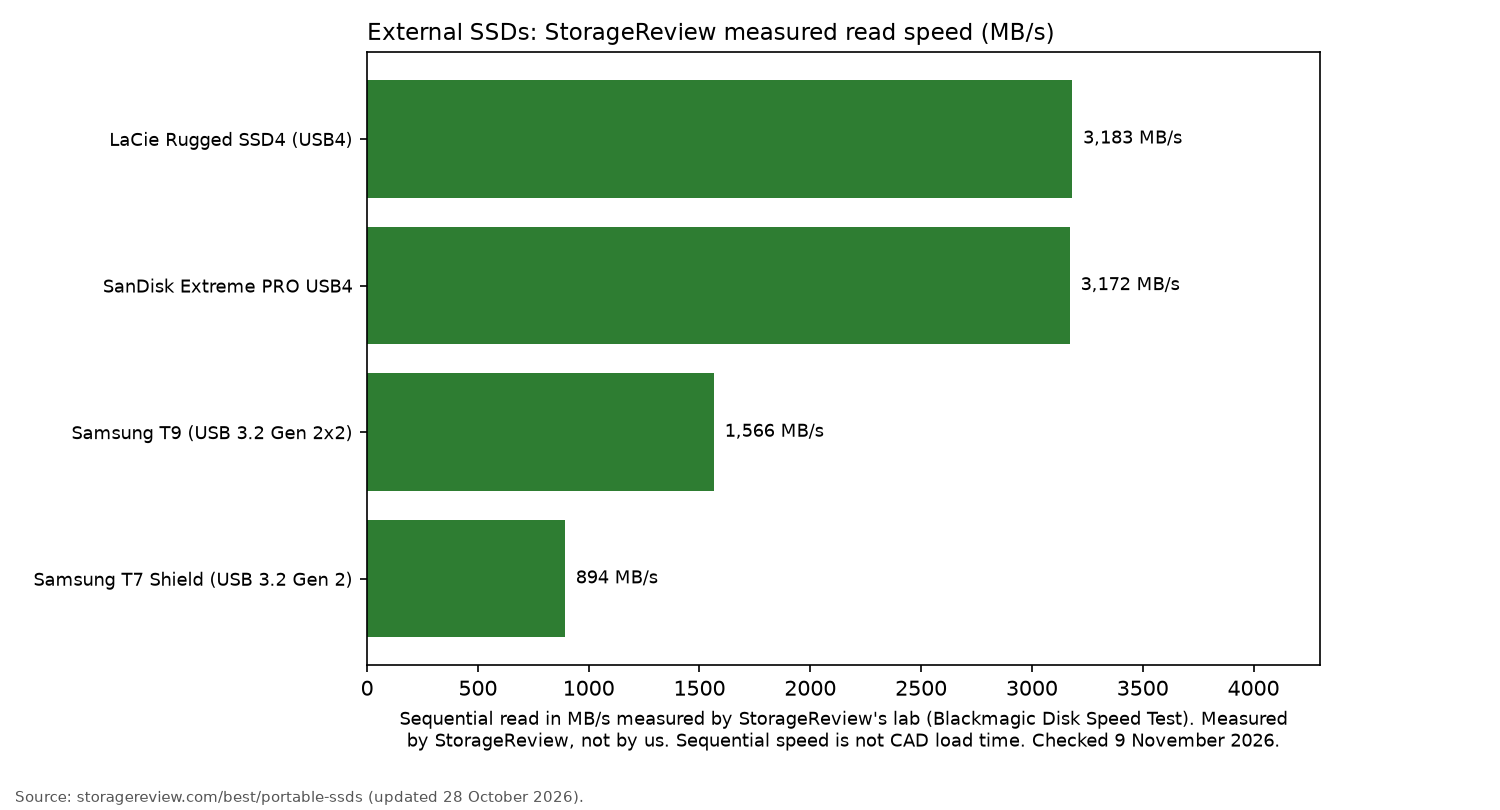
StorageReview names it the "Best USB4 Alternative", with a measured read speed of 3,172 MB/s. It also reports an IP65 rating and 2m drop resistance.
Who it's for: engineers working on large assemblies with a USB4 or Thunderbolt laptop. Who it isn't for: anyone using an older laptop limited to USB 3.2 Gen 2 ports.
SanDisk Extreme PRO USB4 4TB
The LaCie Rugged SSD4 is StorageReview's overall pick, with a measured read speed of 3,183 MB/s. Android Central described it as "built to last" and noted its three-year warranty.
On 9 November 2026 the only Amazon UK listing we found showed low stock and bullet points that did not match USB4, so there is no button for it here.
Samsung T9: best USB 3.2 Gen 2x2 working SSD
The Samsung T9 uses USB 3.2 Gen 2x2, with speeds quoted at up to 2,000 MB/s and drop resistance up to 3m, according to the listing.
StorageReview calls it "Best Mainstream Availability" and measured 1,566 MB/s read, but notes it has no IP rating.
Who it's for: Windows workstations with a 20Gbps USB-C port. Who it isn't for: laptops without a USB-C port rated for 20Gbps. Check the port specification before spending extra on Gen 2x2.
Samsung T9 2TB
Crucial X10 Pro: Gen 2x2 alternative with a longer warranty
The Crucial X10 Pro has quoted speeds of up to 2,100/2,000 MB/s. Crucial also specifies IP55 dust and water resistance, drop resistance up to 2m, and a 5-year warranty.
The listing adds password protection backed by 256-bit AES hardware encryption.
Who it's for: engineers taking their working drive between home and the office. Who it isn't for: anyone who needs a PIN keypad.
Crucial X10 Pro 2TB
Samsung T7 and SanDisk Extreme: best value everyday SSDs
The Samsung T7 and SanDisk Extreme are both USB 3.2 Gen 2 SSDs, with quoted read speeds of up to 1,050 MB/s. The SanDisk Extreme listing also specifies an IP65 rating.
On 9 November 2026, the Samsung T7 was sold by a third-party seller, ST TECH ZONE, and dispatched by Amazon. The SanDisk Extreme was labelled "Older Model", and the listing showed low stock on 9 November 2026.
Who it's for: students, smaller projects and keeping a second working copy. Who it isn't for: engineers opening multi-gigabyte assemblies throughout the day.
Samsung T7 2TB
SanDisk Extreme Portable SSD 2TB
WD Elements Desktop 16TB and Seagate Expansion Desktop 10TB: best archive drives
The WD Elements Desktop 16TB and Seagate Expansion Desktop 10TB are both mains-powered USB 3.0 hard drives.
The WD listing specifies a 2-year warranty, while the Seagate listing includes Rescue Data Recovery Services.
On 9 November 2026, both Amazon UK listings were from third-party sellers, Quality Value Supplies for WD and Nexa Sales for Seagate, with Amazon handling dispatch.
Who it's for: completed project archives stored at a desk. Who it isn't for: live project work or taking files to site.
WD Elements Desktop 16TB
Seagate Expansion Desktop 10TB
iStorage diskAshur PRO3 and Apricorn Aegis Padlock SSD: client-confidential drawings
The iStorage diskAshur PRO3 listing specifies an 8 to 64-digit PIN keypad and AES-XTS 256-bit hardware encryption.
Its product title says "FIPS Level 3 certified", but one of the bullet points describes FIPS 140-3 Level 3 as "pending", so treat certification as unconfirmed.
The Apricorn Aegis Padlock SSD listing specifies separate admin and user modes, brute-force defence and speeds up to 350 MBps. On 9 November 2026, the listing showed low stock.
Who it's for: engineers handling drawings subject to client confidentiality terms. Who it isn't for: large live assemblies. Both drives are slower than the working SSDs covered above.
iStorage diskAshur PRO3 SSD 1TB
Apricorn Aegis Padlock SSD 1TB
More options are in our encrypted external hard drive guide.
Taking drives to site
On site, dust, rain and drops make IP ratings and drop specs matter. Our rugged external hard drive guide covers those drives, and healthcare readers have their own guide for healthcare workers.
A working drive is not a backup
The NCSC advises small organisations to back up all the data they need to keep operating.
Keep a second copy of live projects on a NAS or another drive, and protect the NAS with a UPS.
Our website maintenance checklist includes a restore test you can borrow for project files. The steps for the site itself are in how to back up a website.
FAQ
- SSD or HDD for CAD project folders?
- Choose an SSD for project folders you open and move regularly. An HDD makes more sense for completed archives, where storage capacity matters more than speed.
- Can I run CAD projects straight off an external drive?
- Yes, it is possible with a fast SSD. Keep all references together and make sure the drive is backed up. Maker speed figures do not predict load times.
- Do I need Thunderbolt or is USB 3.2 enough?
- USB 3.2 Gen 2 or Gen 2x2 is suitable for most projects. USB4 or Thunderbolt offers a benefit only when your laptop has the matching port.
- How much capacity do engineering project archives need?
- Start by counting your completed project folders. Allow extra space for future projects and a second copy. The desktop archive drives covered here offer 10TB and 16TB.
- Should drives with client drawings be encrypted?
- Check the terms set by your client. A PIN-keypad drive helps protect files if the drive is lost, but on its own it does not make you compliant.
- What format works on both Windows and Mac?
- exFAT, which both Windows and Mac can read and write.
More from Site Nurturing: Backups and security · Office tech · How we review